


Tình trạng lỗi xảy ra trong lúc đang sử dụng các thiết bị khiến người dùng hoang mang. Nếu bạn đang gặp phải những rắc rối do iPad không may bị vô hiệu hóa trong quá trình sử dụng thì đừng lo lắng nhé! Hãy cùng xem cách khắc phục iPad bị vô hiệu hóa một cách nhanh chóng và dễ dàng tại bài viết sau cùng Tiki Blog!
Nguyên nhân khiến iPad bị vô hiệu hóa
Một số nguyên nhân có thể khiến iPad bị vô hiệu hóa như:
- Thiết bị của bạn vô tình bị nhiễm phần mềm có hại.
- Cập nhật iOS/iPadOS lỗi.
- Phiên bản iOS đã lỗi thời.
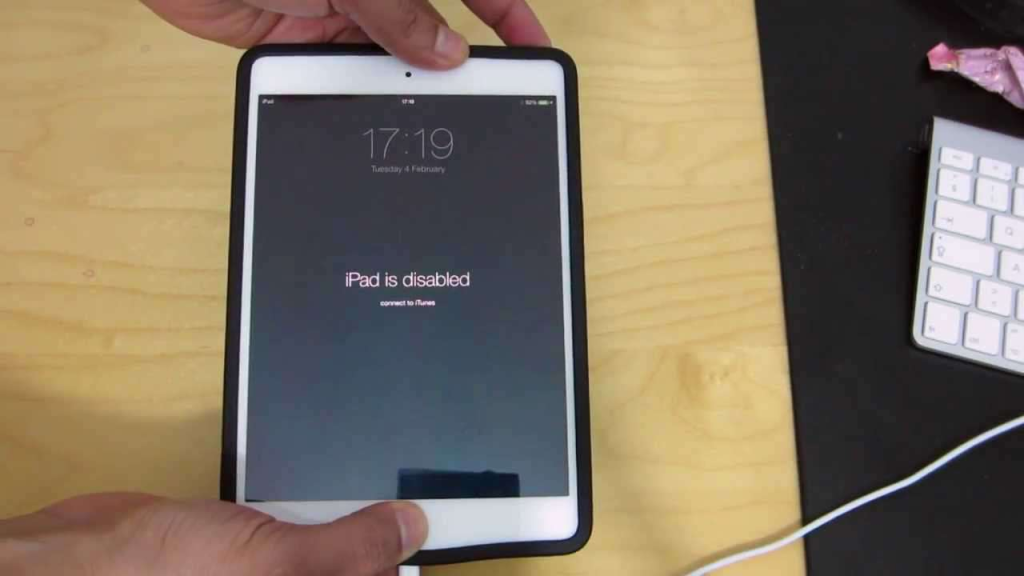
Ngoài ra, iPad là một sản phẩm được biết đến với công nghệ bảo mật cao, yêu cầu người dùng nhập đúng mật khẩu trong 5 lần. Do đó, máy sẽ bị vô hiệu hóa sau lần nhập sai thứ 6. Và, tùy thuộc vào số lần nhập không chính xác mà thời gian chờ bắt buộc để nhập lại mật khẩu thường sẽ lâu hơn, cụ thể như sau:
- Sau lần nhập sai thứ sáu, màn hình sẽ xuất hiện thông báo thiết bị bị vô hiệu hóa và bạn sẽ phải đợi 1 phút trước khi thử lại.
- Khi bạn nhập sai mã lần thứ bảy, thời gian bắt buộc phải đợi sẽ tăng lên 5 phút, 15 phút và có thể lên đến 60 phút.
- Sau 10 lần nhập mật khẩu không chính xác, iPad sẽ bị vô hiệu hóa hoàn toàn và tất cả dữ liệu trên thiết bị sẽ bị xóa.
Cách khắc phục iPad bị vô hiệu hóa
Dưới đây là những cách khắc phục tình trạng vô hiệu hóa của iPad hiệu quả và nhanh chóng cho bạn!
Cách mở khoá iPad bằng iCloud
Cách này chỉ có thể áp dụng khi máy của bạn đã bật Tìm iPad trước đó. Các bước mở khóa iPad bằng iCloud như sau:
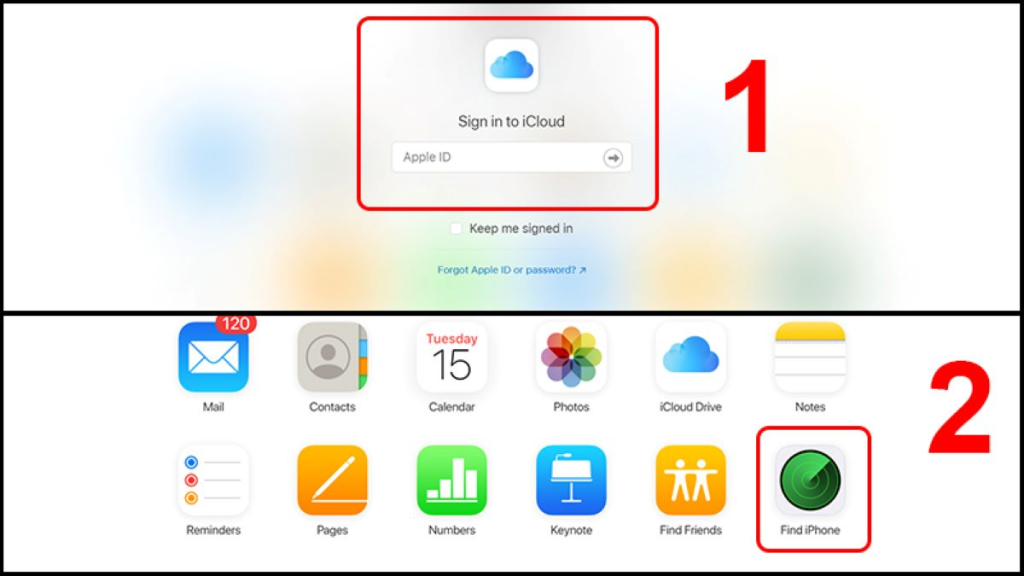
Bước 1: Sử dụng cổng USB để kết nối iPad với máy tính ⇒ Truy cập vào https://www.icloud.com ⇒ Đăng nhập vào tài khoản iCloud của bạn ⇒ Click vào Find iPhone.
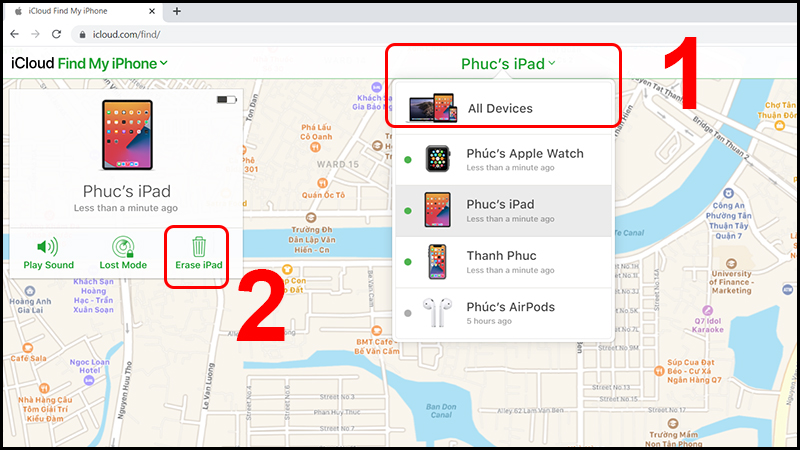
Bước 2: Ở góc trên bên phải màn hình có phần All Devices, bạn chọn iPad muốn cài đặt lại ⇒ Bấm vào Erase iPad để khôi phục iPad.
Bước 3: Tiếp theo, bạn vào iOS Setup Assistant để đưa iPad về bản backup gần đây nhất.
Mở khoá iPad bằng cách kết nối với iTunes không cần máy tính
Việc khởi động và mở khóa iPad của bạn mà không cần phải khôi phục thiết bị sẽ khá đơn giản nếu bạn thường xuyên đồng bộ hóa nó với iTunes.
Bước 1: Trước tiên, kết nối iPad với máy tính đã cài iTunes thông qua cáp Type C – Type C, cáp Lightning hoặc cáp C – Lightning tùy theo đầu cắm sạc của iPad.
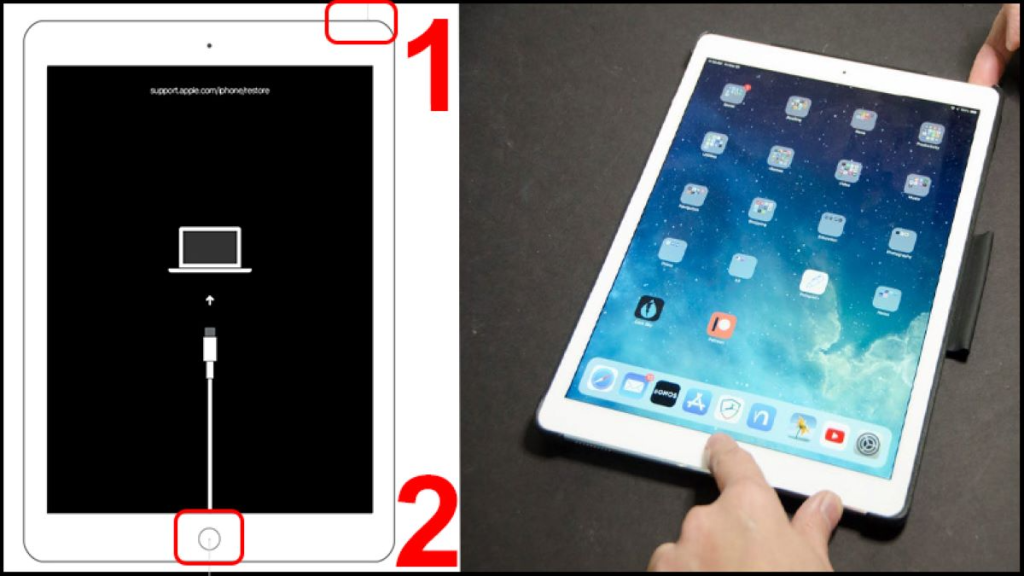
Bước 2: Đặt iPad ở Chế độ Recovery.
- Màn hình iPad không có nút Home: Sau khi kết nối vào máy tính, nhấn nhanh nút tăng âm lượng ⇒ Sau đó, bạn thả tay ra và nhấn nút giảm âm lượng. Tiếp theo, hãy nhấn giữ nút nguồn trong 10 giây cho đến khi iPad hiển thị màn hình Recovery Mode – biểu tượng cáp và máy tính.
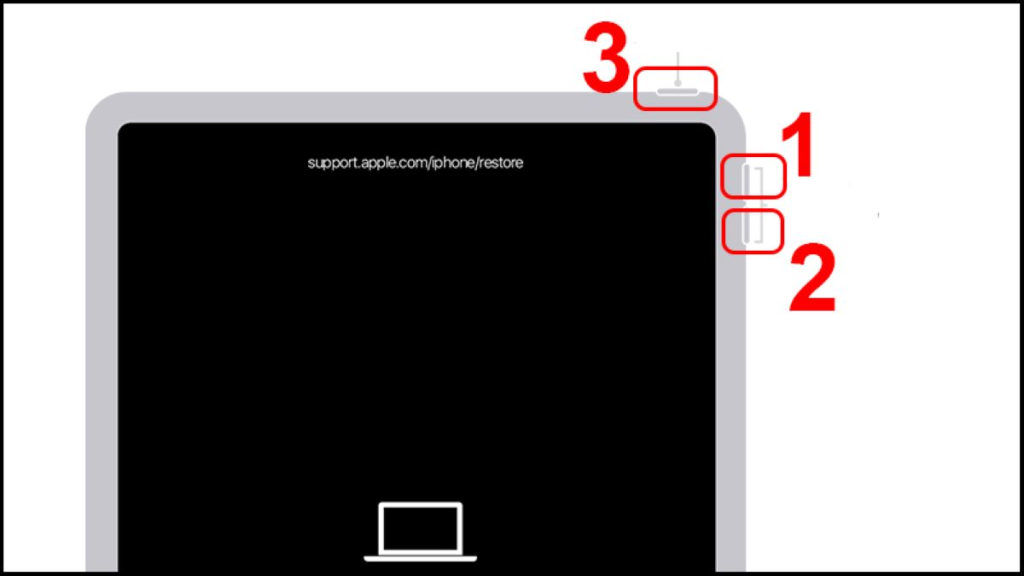
- iPad có nút Home: Sau khi kết nối iPad với máy tính, hãy nhanh chóng nhấn và giữ nút Home với nút Nguồn cho đến khi thiết bị hiển thị màn hình Recovery Mode – biểu tượng cho cáp và máy tính.
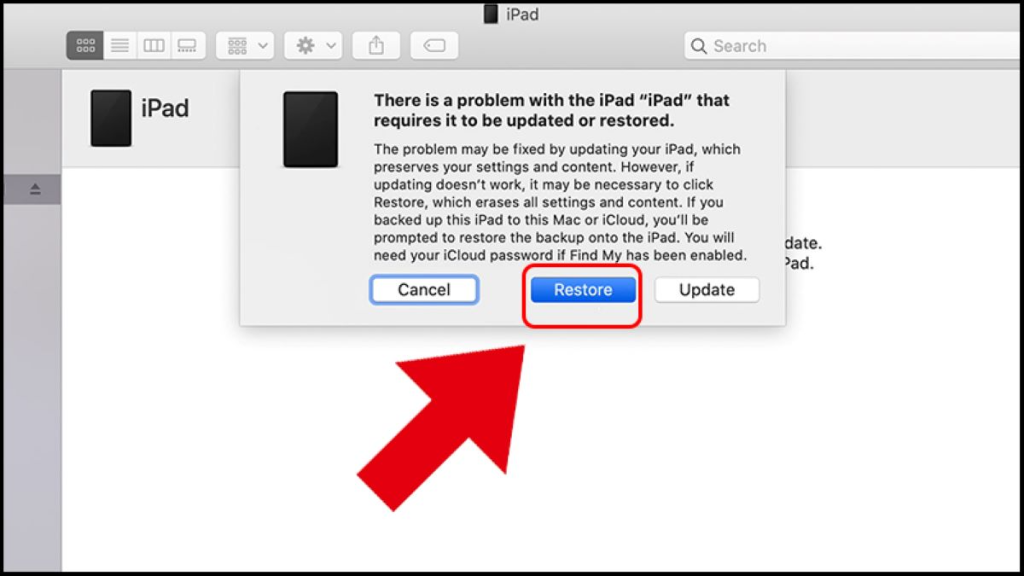
Bước 3: iTunes của máy tính sẽ cảnh báo iPad của bạn gặp sự cố. Lúc này, bạn chọn Restore. Bây giờ, iTunes sẽ tải xuống chương trình và khôi phục iPad của bạn.
Bước 4: iOS setup Assistant sẽ nhắc bạn cài đặt iPad. Khi đó, bạn chọn Restore from iTunes backup.
Bước 5: Bấm vào iPad của bạn và chọn bản backup gần đây nhất.
Mở khóa iPad khi không thể đồng bộ với iTunes
Giải pháp này sẽ phù hợp cho những ai không sử dụng chương trình sao lưu dữ liệu iTunes và không có tài khoản iCloud.
Bước 1: Sử dụng USB để kết nối iPad của bạn với máy tính.
Bước 2: Đặt thiết bị ở chế độ DFU (Device Firmware Update).
- iPad không có nút Home: Sau khi kết nối với máy tính, bạn ấn nhanh nút tăng âm lượng rồi thả ra và nhấn nút giảm âm lượng ⇒ Giữ nút nguồn khoảng 10 giây cho đến khi thiết bị hiện Recovery Mode.
- Màn hình iPad có nút Home: Sau khi được kết nối với máy tính, hãy giữ nút Home và nút nguồn cho đến khi iTunes hiển thị dòng thông báo “iTunes đã phát hiện một iPad ở chế độ khôi phục”.
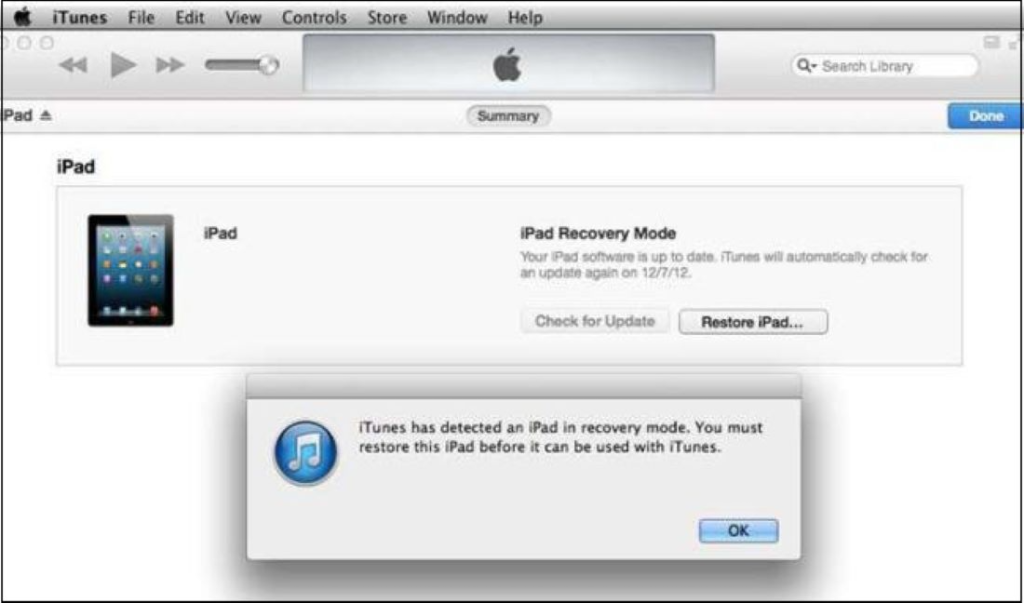
Bước 3: Chọn Khôi phục iPad rồi chọn tiếp Restore from iTunes backup.
Bước 4: Bấm vào iPad của bạn và chọn bản backup gần đây nhất.
Mở Khóa iPad bị vô hiệu hóa bằng 3uTools
Bước 1: Mở http://www.3u.com/ và tải về thiết bị.
Bước 2: Sử dụng cáp Lightning để kết nối iPad với máy tính, sau đó đưa về Chế độ DFU/Recovery.
Bước 3: Nhấp vào Flash & JB ⇒ Easy Flash rồi chọn firmware tương thích với thiết bị. (Chọn Tải xuống nếu firmware chưa được tải xuống. Nếu đã tải firmware thì chọn Import).
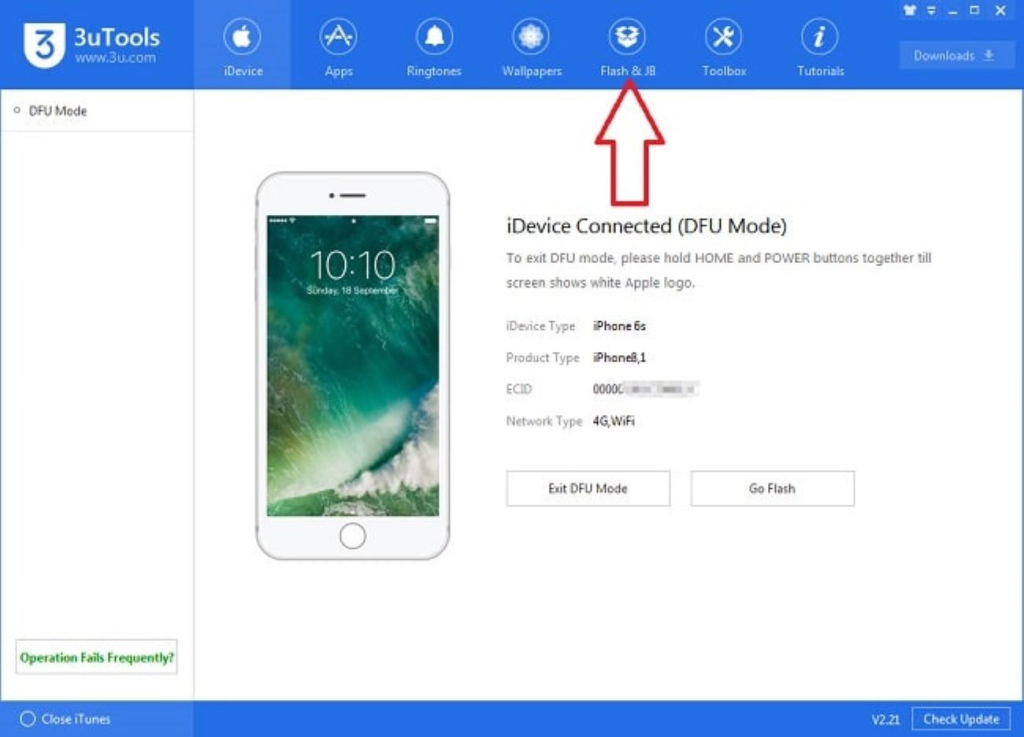
Bước 4: Nhấp vào tệp firmware bạn vừa tải xuống.
Bước 5: Bấm vào Retain User Data While Flashing nếu bạn muốn giữ tất cả dữ liệu khi nâng cấp hoặc chọn Flash nếu bạn chỉ muốn Khôi phục.
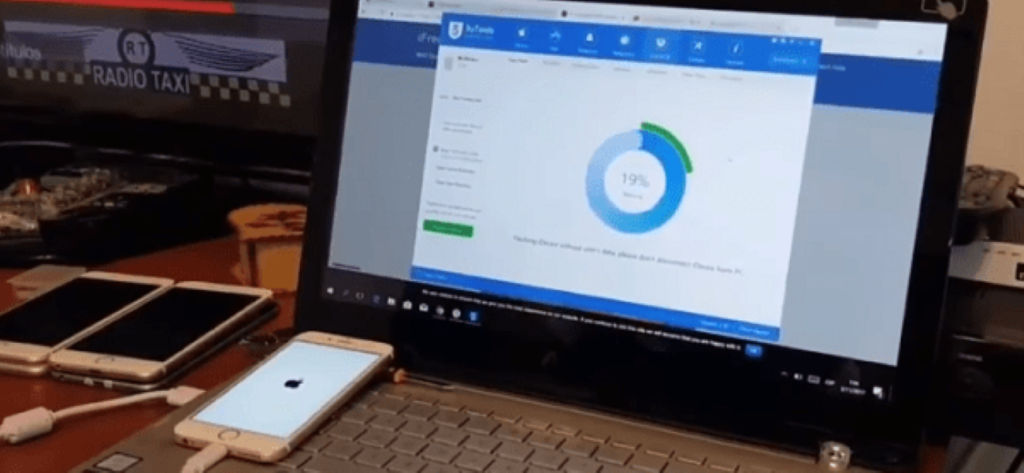
Bước 6: Đợi cho đến khi mọi thứ hoàn tất 100% là xong.
3uTools sẽ tự động tải xuống firmware và flash thiết bị, người dùng chỉ cần chờ vài phút để quá trình hoàn tất. Cần lưu ý rằng bạn phải giữ cho máy tính và iPad được kết nối trong suốt quá trình flash. Khi flash kết thúc, người dùng chỉ cần kích hoạt lại thiết bị là hoàn tất.

Sử dụng phần mềm của bên thứ 3
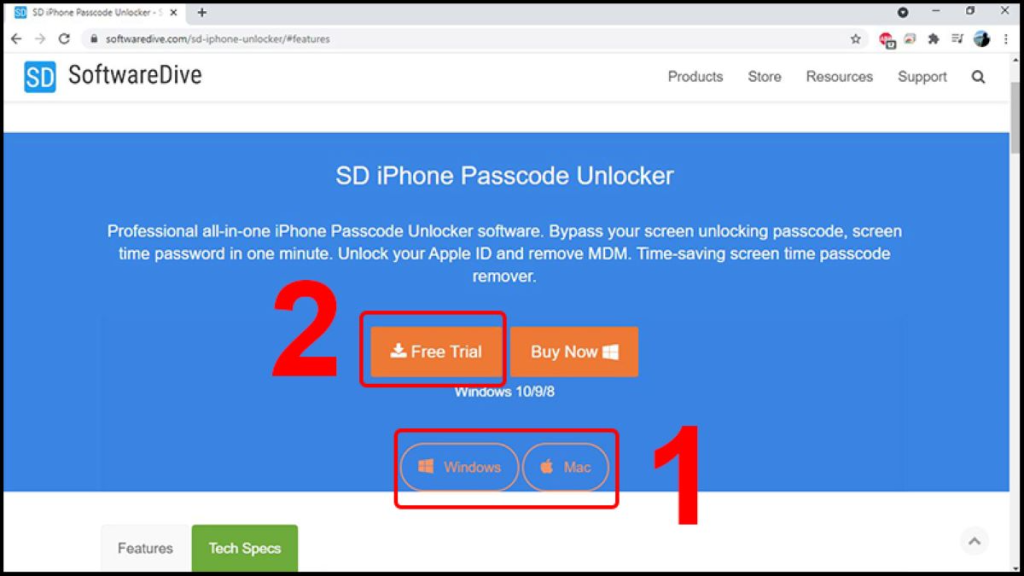
Để khắc phục tình trạng iPad bị vô hiệu hóa, bạn cũng có thể nhờ đến sự trợ giúp phần mềm của bên thứ ba có tên gọi là SD iPhone Passcode Unlocker. Công cụ này không chỉ giúp mở khóa iPad bị vô hiệu hóa mà còn có tính năng tắt chế độ MDM (quản lý doanh nghiệp) và kích hoạt mật khẩu Screentime.
Ngoài ra, phần mềm cho phép trải nghiệm các tính năng nâng cao khi người dùng trả phí hàng tháng là 29,95 USD (xấp xỉ 700.000 đồng). Để mở khóa iPad bị vô hiệu hóa bằng SD iPhone Passcode Unlocker, bạn có thể tải phiên bản dùng thử.
Bước 1: Truy cập vào link: https://www.softwaredive.com/sd-iphone-unlocker/ để tải SD iPhone Passcode Unlocked. Bạn hãy chọn Windows hoặc Mac và bấm vào Free Trial để sử dụng bản dùng thử.
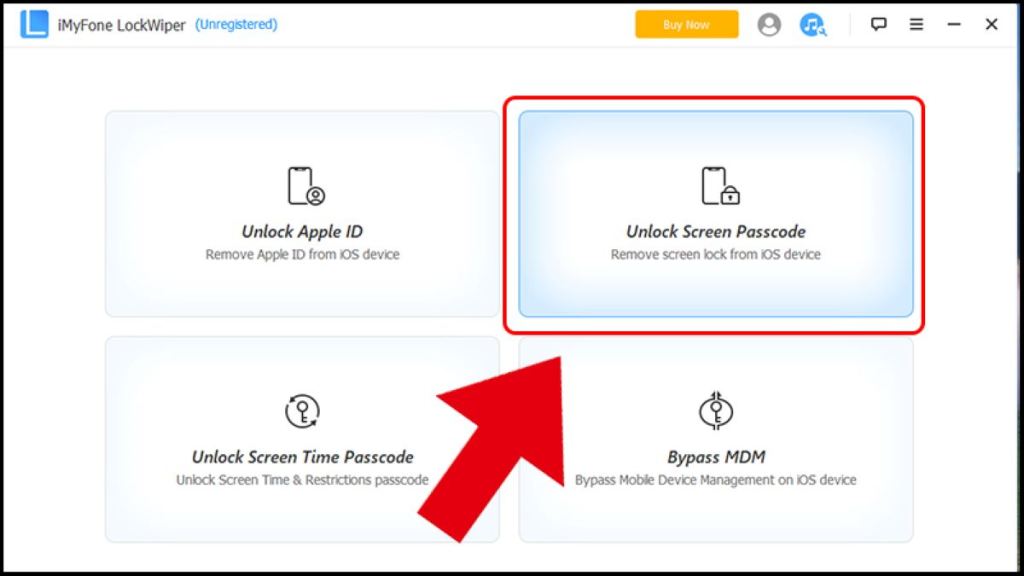
Bước 2: Khởi chạy iMyFone LockWiper và chọn Unlock Screen Passcode.
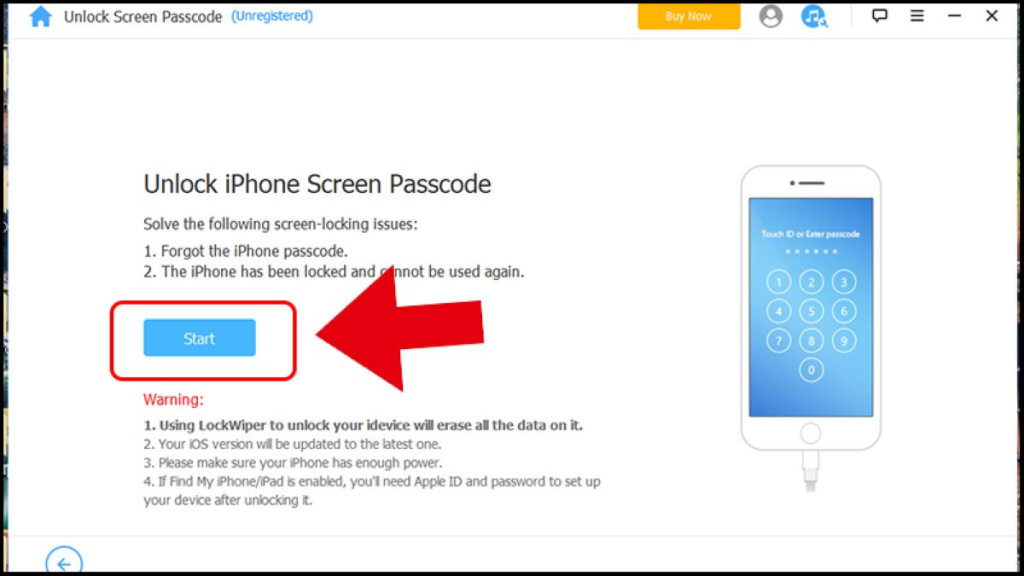
Bước 3: Nhấp vào Start ⇒ Đặt iPad ở chế độ Recovery như được mô tả trong hướng dẫn của cách thứ 2.
Câu hỏi thường gặp
Phần nội dung dưới đây sẽ giúp bạn trả lời những câu hỏi xoay quanh vấn đề iPad bị vô hiệu hóa!
iPad bị vô hiệu hóa trong bao lâu?
Trong lần đầu tiên, iPad sẽ rơi vào tình trạng vô hiệu hóa trong một phút. Khi người dùng nhập mật khẩu không chính xác, thiết bị sẽ bị vô hiệu hóa trong năm phút. Sau đó, nếu bạn liên tục nhập sai mật khẩu quá nhiều lần, iPad sẽ khóa hoàn toàn.
iPad bị khóa màn hình phải làm sao?
Việc iPad bị khóa màn hình sẽ gây ra những bất tiện cho người dùng trong lúc sử dụng để làm việc và học tập. Có nhiều nguyên nhân khiến thiết bị bị vô hiệu hóa và màn hình không thể hoạt động được như đã chia sẻ ở trên. Người dùng cần tìm hiểu nguyên nhân là gì và lựa chọn cách khắc phục phù hợp đối với từng tình huống xảy ra. Khi iPad bị khóa màn hình do nhập sai mật khẩu, các bạn hãy áp dụng những cách khắc phục trên để mở khóa nhé!
iPad bị vô hiệu hóa nhưng quên iCloud có mở được không?
Trong trường hợp bạn quên iCloud của mình, bạn có thể mở khóa iPad bị vô hiệu hóa bằng theo các hướng dẫn khắc phục thiết bị không cần sử dụng tài khoản iCloud đã đề cập ở trên.
Lời kết
Qua bài viết hướng dẫn cách khắc phục iPad bị vô hiệu hóa của Tiki ở trên, hy vọng sẽ hỗ trợ được người dùng thoát khỏi tình trạng bất tiện này và thực hiện thành công để có quá trình sử dụng hiệu quả!


By Thảo Vũ